Distinguish grids, bars and structural divisions
Decorative bars add a visible pattern to glass. Structural divisions describe the opening's frame or pane arrangement. Changing the decorative grid in Fenestry does not split one glass unit into new manufactured units or replace a structural mullion.
Andersen's grille options distinguish between-glass grilles and applied constructions. Use that manufacturer terminology to understand the categories, then confirm the selected supplier's actual construction. Similar appearance does not make those options interchangeable specifications.
Fenestry currently offers No glazing bars, Between-glass bar and Full Vienna bar (applied + duplex). The last option is a conceptual preview of applied bars on both faces plus an internal duplex; it does not specify adhesives, materials or insulating-glass depth.
Compare supported patterns on one opening
In the editable house, select F01 in Windows and doors and inspect Decorative glazing bars. Keep its two existing fixed panes and frame dimensions unchanged. Compare No glazing bars with Full Vienna bar, two fields across and three fields up each pane, with a preferred bar width of 26 mm.
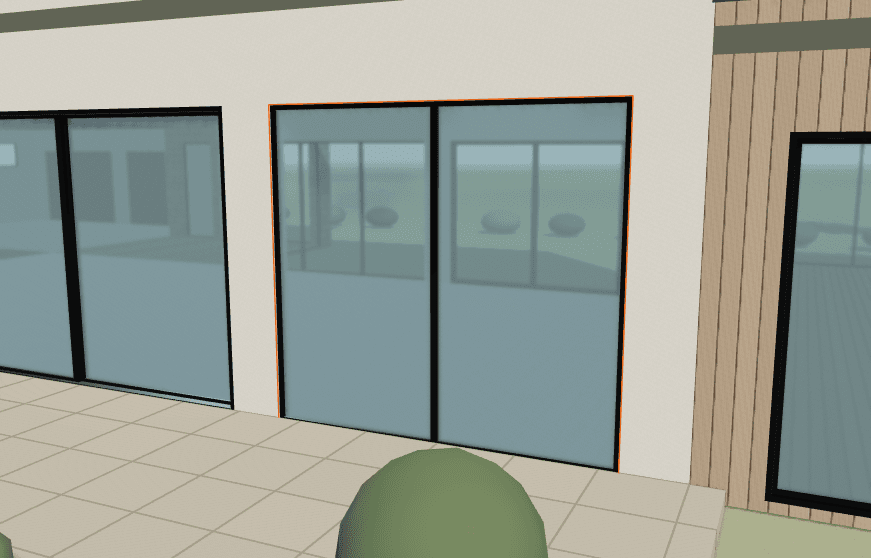
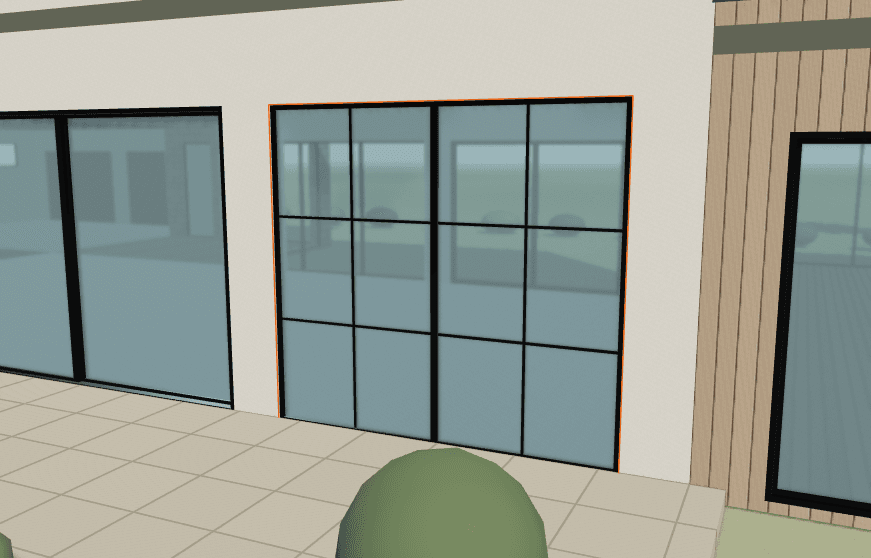
Actual Save image exports from the authored demo. F01 retains its two fixed panes and 3657.6 x 3352.8 mm frame dimensions. Bars repeat inside each pane; the orange edge is a selection highlight, not a finish.
The pattern repeats within each of F01's two panes, so the whole opening has more than two columns of decorative fields. The 26 mm value is a design preference for this example, not an approved product dimension. The orange outline marks the selected opening in the interface.
For a fair visual comparison, retain the same camera, lighting, dimensions and finish. Use a separate design alternative when testing another pattern rather than overwriting the baseline.
Review the pattern across the whole house
After reviewing one opening, use Apply to a group or whole house. Select the intended scope and inspect the preview counts and listed targets before applying. The copy transfers the bar type, grid per pane and preferred width; each target retains its dimensions, operation and frame colors.
Review the result at different pane proportions. The same field count on a narrow window and a wide fixed panel can create different visual spacing. Later edits to the source opening do not automatically update earlier copies.
Read skipped and already-matching counts separately. Undo can restore a batch operation in one step. Do not infer compatibility or final product availability from a successful appearance copy; the design still retains its review requirements.
Record the intended construction separately
| Decision | Keep visible | Confirm separately |
|---|---|---|
| Pattern | Fields per actual pane and affected marks | Final spacing and pattern availability |
| Bar construction | Between-glass or applied-plus-duplex preference | Materials, attachment and glass build-up |
| Appearance | Preferred width and inside/outside colors | Actual bar profiles, finish samples and availability |
Save the editable project and a close-up image, then record the outstanding construction questions in the schedule template. The preview does not assign a thermal value, price or performance rating to a grille choice.
If changing the actual opening arrangement as well, review fixed and operable fields separately. Operation and decorative pattern answer different design questions.